
Important 2025 Tax Information
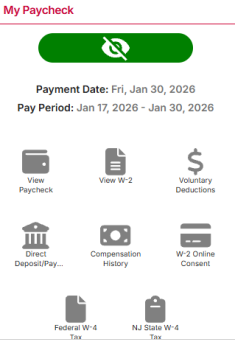
Employees may access the electronic version of their 2025 Form W-2 by logging into the myRutgers portal. Under the "My Paycheck" section, click on the "View W-2" icon to access the page that contains links to your form and filing instructions.
Issues that cannot be resolved through these resources can be directed to the Tax Office at tax@payroll.rutgers.edu or the OneSource Rutgers Faculty and Staff Service Center at 732-745-SERV (7378) or OneSource@rutgers.edu.
To assist with completion of your Form W-2:
Download the 2025 W-2 Guide (PDF)
Review the Frequently Asked Questions (on this page)
Receiving and Accessing W-2 & Other Forms
-
If you have opted to receive an electronic W-2 form, your W-2 will be available through Employee Self-Service on or before February 2, 2026.
If you requested that a copy of the W-2 be mailed to your address on file, you can expect to receive the form after Monday, February 2, 2026, as it is required to be postmarked by that date.
-
Please use either Chrome, Firefox, Internet Explorer, or Safari to view your electronic W-2. Internet Explorer must be at least version 11. Safari and Firefox should be updated to their latest versions. You need to turn off pop-up blockers on your browser by following the instructions below:
Chrome:
- Launch your browser
-
Click the three-dots on the upper right-hand corner of the web browser
-
Scroll down and select “settings”
-
On the left-hand side of the webpage, select “Security and Privacy”
-
Scroll down and select “Site Settings”
-
Scroll down to the very bottom and select “Pop-ups and redirects"
-
Under “Default behavior” select the option “Don’t allow sites to send pop-ups or redirects”
Firefox:
-
Launch your browser
-
Click the three-bar hamburger on the upper right-hand corner of the web browser
-
Scroll down and select “settings”
-
On the left-hand side of the webpage, select “Privacy and Security”
-
Scroll down to the “Permissions” section and uncheck the box next to “Block pop-up windows” to disable the pop-up blocker
Microsoft Edge:
-
Launch your browser
-
Click the three-bar hamburger on the upper right-hand corner of the web browser
-
Scroll down and select “settings”
-
On the left-hand side of the webpage, select “Cookies and site permissions”
-
Scroll down and select “Pop-ups and redirects"
-
Toggle off the “Block (recommended)” switch to disable pop-up blockers
Safari:
-
Launch your browser
-
Click on the “Safari” tab on the top left-hand side of the screen
-
From the drop-down menu, select “Preferences”
-
From the tabs select “Websites”
-
Go to the “General” pane on the left-hand side and select “Pop-up Windows”
-
Go to the “When visiting other websites” setting at the very bottom and select “Block and Notify” on the drop down menu
-
No, due to the confidential nature of a W-2, it cannot be faxed.
-
The filing instructions should be on the back of your Form W-2, however, if your form does not include filing instructions, you can access them here.
-
If you lose your Form W-2 or do not receive it, and you are currently employed by Rutgers, then you can print an original copy from the myRutgers portal under “My Paycheck” by selecting “View W-2” and then print the form.
If you are no longer employed by Rutgers and require a copy of your W-2, please contact the Rutgers OneSource Faculty and Staff Service Center at (732) 745-7378
-
No, you will receive a single W-2 that includes the combined wages and taxes for all jobs paid through Rutgers Payroll Services.
-
Under the provisions of the Affordable Care Act (ACA), employers are required to issue Form 1095-C Employer-Provided Health Insurance Offer and Coverage. For tax year 2025, the University must issue these forms to employees by March 15, 2026. For additional information about this form, please contact the Rutgers OneSource Faculty and Staff Service Center at (732) 745-7378.
-
Foreign National Employees or Students with Nonresident Tax Status:
If a Foreign National employee or student with nonresident tax status received a scholarship/fellowship from Rutgers University or used a tax treaty to exempt some or all their wages from federal withholding taxes, these amounts will be reported on a Form 1042-S, “Foreign Person’s U.S. Source Income Subject to Withholding.” The individual will receive a Form 1042-S wage/tax statement from the Payroll Services prior to March 15, 2026. Some individuals will receive both Forms W-2 and 1042-S. For questions related to Foreign Nationals, please contact the University Tax Department at (848) 445-2284.
Form 1099-MISC and 1099-NEC:
All questions concerning Forms 1099-MISC and 1099-NEC (for non-payroll related payments paid to individuals through Accounts Payable) should be addressed to the University Tax Department at (848) 445-2284.
Form 1098-T:
All questions pertaining to Form 1098-T (Education-related expenses paid by students to the Student Account) should be addressed to Student Accounting Services at (848) 932-2254. For more information, please visit http://studentabc.rutgers.edu/tax-information or https://studentabcweb.rutgers.edu/taxstatements/
Form 1098-E:
All questions pertaining to Form 1098-E (Student Loan interest paid by student borrowers to the University Cashier) should be addressed to Student Accounting Services at (848) 932-2254 or studentabc@rutgers.edu
Form W-2 Questions
-
If your wages do not match your year-to-date earnings amount, then your before-tax deductions may not be included in your taxable wages. Conversely, your YTD Earnings amount does not include the taxable portion of items such as your Group Term Life Insurance benefit, NJ Wellness, and third-party sick pay.
-
There are several reasons why these amounts may differ. For example, your pay rate may have changed during the year, or you may have received overtime or other compensation.
Additionally, your annual salary is paid on a fiscal year basis, from June 1 to July 31. Your W-2 statement reflects all the wages you received for the calendar year, from January to December.
-
Government regulations determine how each type of wage is reported and taxed by the various federal and state agencies.
Your W-2 will show one or more of the following types of wages:
-
Box 1 – Wages, Tips, Other Compensation - Wages subject to Federal income tax.
Your gross wages for Federal income tax are reduced by “pre-tax” payroll deductions for pension, health insurance, dental insurance, vision insurance, accidental death, and disability insurance, and for pre-tax parking. -
Box 3 – Social Security Wages - Wages that are subject to Social Security tax.
The Social Security wage base for 2025 is $176,100. The amount in this box will never be more than $176,100. -
Box 5 – Medicare Wages and Tips - Wages subject to Medicare taxes.
Please Note: Your gross wages for Social Security and Medicare are reduced by “pre-tax” payroll deductions for health insurance, dental insurance, vision insurance, accidental death, and disability insurance, and for pre-tax parking. If your Social Security wages exceeded $176,100, Social Security tax was withheld on the first $176,100 of wages. This is the maximum amount from which social security taxes can be withheld for 2025. Medicare has no maximum.
-
Box 16 – State Wages, Tips, Etc.
For NJ residents: total wages that are subject to State income tax include the “Imputed Group Term Life and Health” amount.
For PA residents: total wages are reduced by the “pre-tax” payroll deductions for health and dental insurance, and do not include the “Imputed Group Term Life and Health” amount.
-
-
If you paid more social security tax than you believe you should have, then you can request a refund for the excess when filing your Federal tax return.
-
The amount in this box reports the Family Care Reimbursement Account Contributions deducted from your paycheck. This amount has already been deducted on a before-tax basis. Consult a tax advisor for more details.
-
IRS codes are explained on the back of W-2 Form “Copy 2 (File with State, City, and local taxes) and C (Employee’s Record.) If you choose to print your Form W-2 via myRutgers portal, the filing information on the back of the printed Form W-2. It also is located at the link titled “Filing Instructions.”
Rutgers employees may participate in five types of tax-deferred annuity programs – Code Section 401(a), 403(b), Roth 403(b), 457, and Roth 457.
There are several IRS codes that may be applicable for Rutgers employees:
- C - Imputed Income for basic & supplemental life insurance (included in box 1, 3 (up to social security wage base), 5 and 16.
Imputed income is the method of taxing you on the portion of your life insurance premium that is for coverage in excess of $50,000. Code “C” is reporting the taxable cost of the group-term life insurance over $50,000. This amount is taxable and is included in boxes 1, 3, 5, and 16.
- E - Elective deferrals under section 403(b) salary reduction agreement.
- G - Elective deferrals and employer contributions (including non-elective deferrals) to a section 457(b) deferred compensation plan.
- DD- Cost of employer-sponsored health coverage.
This amount is not taxable and is for informational purposes only. The purpose of including this information is to provide employees with useful and comparable consumer information on the cost of their health care coverage.
If you choose to print your Form W-2 from the myRutgers portal, the filing information on the back of the printed Form W-2 is located by clicking on the link titled “Filing Instructions.”
Any amounts that have been deducted on a beforetax basis generally may not be deducted again. Consult a tax advisor for more information.
- C - Imputed Income for basic & supplemental life insurance (included in box 1, 3 (up to social security wage base), 5 and 16.
-
Code “C” is reporting the taxable cost of the group-term life insurance over $50,000. This amount is taxable and is included in boxes 1, 3, 5, and 16.
-
Code “DD” indicates the amount of employer paid health coverage under our employer-sponsored health plan. This amount is not taxable. The purpose is to provide employees with useful and comparable consumer information on the cost of their health care coverage.
-
Box 14 may contain the following codes:
- 414H – Contributions (mandatory) to retirement plan
- PT MED-FSA – This amount is a combination of your health, dental, drug, as well as any flexible spending account you may have
- Pkg- MTRAN – This amount is the parking expense and /or mass transit expense
Please note: all these items are for informational purposes and should not be used as part of your federal or state income tax return filings.
The "414H Plan" represents the mandatory retirement plan contributions amount deducted from your salary on a before-tax basis. Any amounts that have been deducted on a before-tax basis generally may not be deducted again. Consult your tax advisor for more details.
-
-
Box 17 – FLI
This amount represents the employee portion of NJ family leave insurance (FLI) based on a taxable wage base of $165,400.00 for calendar year 2025. The maximum yearly dollar limit for calendar year 2025 is $545.82, calculated by multiplying the 2025 taxable wage base of $165,400 by the 2025 FLI tax rate of 0.33%.
This amount may be deductible as other taxes paid when filing your federal income tax return.
Please Note: this amount should not be combined with State income tax in Box 17 when filing your NJ Income Tax Return.
If you believe you paid excess NJFLI because you worked for more than one employer in 2025, then you can request a refund for the excess when filing your NJ State Income tax return.
-
Box 19 – Local income tax
The amounts represent the employee portion of:
- NJ UI (state unemployment insurance),
- NJ WF (supplemental workforce assessment fund),
- NJ S (workforce development partnership fund), and
- NJ DI (temporary disability insurance) and are calculated as follows:
The 2025 maximum yearly dollar limit of $165.62 for SUI is calculated by multiplying the 2025 taxable wage base of $43,300.00 by the 2025 SUI tax rate of 0.3825%.
The 2025 maximum yearly dollar limit of $7.58 for SWAF is calculated by multiplying the 2025 taxable wage base of $43,300.00 by the 2025 SWAF tax rate of 0.0175%.
The 2025 maximum yearly dollar limit of $10.83 for WDPF is calculated by multiplying the 2025 taxable wage base of $43,300.00 by the 2025 WDPF tax rate of 0.0250%.
The 2025 maximum yearly dollar limit of $380.42 for DI is calculated by multiplying the 2025 taxable wage base of $165,400.00 by the 2025 DI tax rate of 0.2300%
Please Note: These amounts do not represent local income tax and should not be combined with State income tax in Box 17 when filing your NJ Income Tax Return. These amounts may be deductible as other taxes paid when filing your federal income tax return.
Please Also Note: Many third-party income tax return preparation software providers will request that you provide any local wages shown in Box 18 and any local taxes shown in Box 19. As you will notice, there are no local wage amounts to report in Box 18. The reason for this is that NJ does not have a local wage or tax filing requirement. Therefore, when prompted to add an amount, you should not enter anything relating to local taxes in Box 18 and remove any information in Box 19.
-
Box 20 – Local Name
These names UI/WF/S and DI do not relate to any local wages or taxes.
-
Incorrect Information on W-2
-
Please contact OneSource Rutgers Faculty and Staff Service Center at (732) 745-7378.
If a W-2C is prepared to correct your name and/or social security number, Rutgers is required by law to submit a W-2C to federal and state government agencies (Social Security Administration, Internal Revenue Service, and your State of residence). You will need to include the W-2C and your original W-2 when you file your tax return.
-
You may submit a W-2 that has an incorrect address with your tax return. The Tax Department does not re-issue or issue an amended form (i.e., W-2C – Corrected Wage and Tax Statement) due to an incorrect address. It is recommended that you correct your address in the myRutgers portal under “My Profile” by selecting “Personal Information.”
-
Please contact the OneSource Rutgers Faculty and Staff Service Center at (732) 745-7378 and be prepared to discuss which box you believe is incorrect and why.
Additional Information
-
The amount of taxes withheld does not determine whether you should file a tax return. The requirement to file a return is based primarily on the amount earned, citizenship status, dependency status, and age. Refer to the section titled “Do You Have to File?” in the federal tax Form 1040, Form 1040EZ, or Form 1040NR instructions for information.
The forms are available at your local IRS and NJ Division of Taxation offices and on their websites shown below. The University does not stock these individual tax forms. You may also call the Internal Revenue Service (IRS) at 1-800-829-1040 from 7 a.m. until 10 p.m. at all local time zones for help in determining your filing status.
-
EIC (Earned Income Credit) is also referred to as EITC (Earned Income Tax Credit). EIC is a refundable federal tax credit for working individuals who have lower incomes. If eligible, the tax credit can be claimed when you file your income tax return. The EIC is not available to nonresident alien individuals or to students who are exempt from social security taxes.
For more detailed information on the EIC:
-
Use the interactive EITC Assistant at https://www.irs.gov/credits-deductions/individuals/earned- income-tax-credit to determine if you qualify.
-
Call the IRS toll free at 1-800-TAX-1040
-
Visit a Volunteer Income Tax Assistance site for free help and tax preparation.
-
Access Publication 962 on the IRS website. (Both English and Spanish editions are available.)
If you have any additional questions, please contact the University Tax Department at (848) 445-2284.
-
-
- IRS Information: (800) 829-1040
-
IRS Forms: (800) 829-3676
-
IRS Website: https://www.irs.gov/
-
NJ Division of Taxation Information: (609) 292-5033
-
NJ Division of Taxation Website: https://www.state.nj.us/treasury/taxation/